Vision Protocol
This page describes the layers that deliver and decode the vision data stream from the field.
League Software
There are two pieces of league maintained software that interpret camera data to produce a vision data stream:
(Recommended) Vision Processor
(Legacy) SSL Vision
If you’re actively trying to connect to a field, you’ll need to make sure at least one is running and has a valid field geometry calibration. More info about running each tool can be found in the repo linked above.
Transport
The transport layer is responsible for delivering raw data to the team
computers from the field. It doesn’t say anything about the data it’s delivering, but this is the first step of field
connectivity. As shown in the diagram below, a team computer connects to the field’s vision data stream by joining the
vision multicast group. The league defines this multicast group as having an address of 224.5.23.2 at port 10006.
You join a multicast group just like you connect to any IP address and port combo, though you may need to pass some
additional options when binding the socket. Consult the documentation for the language of your choosing.
        ---
config:
  layout: elk
  elk:
    nodePlacementStrategy: NETWORK_SIMPLEX
---
flowchart TD
    Team["Team Client<br/>IGMP join only"] -- "IGMP Join<br/>224.5.23.2:10006" --> Net["Switch / Router<br/>duplicates stream"]
    Vision["Vision Processor"] -- "SSL_WrapperPacket<br/>UDP multicast, continuous, no ack" --> Net
    Net -- "SSL_WrapperPacket" --> Team

    classDef purple fill:#faf5ff,stroke:#9333ea,color:#581c87;
    classDef cyan fill:#ecfeff,stroke:#0891b2,color:#164e63;
    classDef gray fill:#f1f5f9,stroke:#64748b,color:#1e293b;
    class Team purple;
    class Vision cyan;
    class Net gray;
Once you’ve joined, you should expect to receive messages on a regular interval. Robot and Ball detections will arrive at the framerate of the field camera(s), usually 60-75Hz. You will also receive field geometry data every few seconds. Do not assume the dimensions of the field in your software. No field is perfect and your software/AI should always operate on the real physically constructed field dimensions. These will be loaded into the league vision software, calibration will occur, and final field geometry will be sent on the vision data channel. Always use this data as your source of truth for the field. Competition fields are often off by up to a few cm and aspect ratio is not preserved.
Shown in the join sequence diagram below is also a dropped detection frame. Note that re-transmission does not occur. Packet loss should be well below 1%. If it’s not, network quality investigation is warranted.
        %%{init: {"sequence": {"useMaxWidth": false, "actorMargin": 220, "messageMargin": 40}}}%%
sequenceDiagram
    participant Team as Team Client
    participant Net as Switch / Router<br/>(multicast group 224.5.23.2:10006)
    participant Vision as Vision Processor

    Team->>Net: IGMP Join 224.5.23.2:10006
    Note over Team,Vision: No handshake — Team is now another multicast receiver

    Vision->>Net: SSL_WrapperPacket<br/>detection (frame 1)
    Net->>Team: SSL_WrapperPacket<br/>detection (frame 1)

    Vision->>Net: SSL_WrapperPacket<br/>detection (frame 2)
    Net->>Team: SSL_WrapperPacket<br/>detection (frame 2)

    Note over Vision,Team: Geometry publisher re-sends field geometry every 1s

    Vision->>Net: SSL_WrapperPacket<br/>geometry
    Net->>Team: SSL_WrapperPacket<br/>geometry

    Vision->>Net: SSL_WrapperPacket<br/>detection (frame 3)
    Net->>Team: SSL_WrapperPacket<br/>detection (frame 3)

    Vision->>Net: SSL_WrapperPacket<br/>detection (frame 4)
    Net--xTeam: SSL_WrapperPacket<br/>detection (frame 4) — dropped
    Note over Team: No retransmission — team just waits for the next frame

    Vision->>Net: SSL_WrapperPacket<br/>detection (frame 5)
    Net->>Team: SSL_WrapperPacket<br/>detection (frame 5)
Connections Table
The following table contains all relevant connection information related to vision data streams.
Protocol |
Protobuf |
Type |
Address |
Port |
|---|---|---|---|---|
SSL-Vision Detections |
UDP Multicast |
224.5.23.2 |
10006 |
Message Format
Now that a data stream is received, the raw data needs to be decoded. The league uses google protobuf to define the data format actually sent via multicast. The interface definitions are available in the league protobuf repository. The definition file there are needed to decode the raw data. The image below shows the hierarchy of the data structure send in the data stream.
        ---
config:
  layout: elk
  elk:
    nodePlacementStrategy: NETWORK_SIMPLEX
---
flowchart TD
    Wrapper["SSL_WrapperPacket<br/>one of detection / geometry present"]
    Wrapper --> Detection["SSL_DetectionFrame<br/>camera_id, frame_number,<br/>t_capture, t_sent"]
    Wrapper --> Geometry["SSL_GeometryData"]

    Detection --> Balls["balls[]<br/>SSL_DetectionBall"]
    Detection --> RY["robots_yellow[]<br/>SSL_DetectionRobot"]
    Detection --> RB["robots_blue[]<br/>SSL_DetectionRobot"]

    Geometry --> Field["field<br/>SSL_GeometryFieldSize"]
    Geometry --> Calib["calib[]<br/>SSL_GeometryCameraCalibration"]

    classDef slate fill:#f8fafc,stroke:#475569,color:#0f172a;
    classDef cyan fill:#ecfeff,stroke:#0891b2,color:#164e63;
    classDef purple fill:#faf5ff,stroke:#9333ea,color:#581c87;
    classDef amber fill:#fffbeb,stroke:#d97706,color:#78350f;
    class Wrapper slate;
    class Detection,Geometry cyan;
    class Balls,RY,RB purple;
    class Field,Calib amber;
There are two top level data structures, SSL_DetectionFrame and SSL_GeometryData. These correspond to the packet types seen in the join sequence diagram above. SSL_DetectionFrame is the meat of the data stream, and as seen in the diagram, contains only the positions and orientations of friendly robots, opponent robots, and balls. It also includes timing information so you can tell if a packet has been lost or has arrived out of order. SSL_GeometryData is sent on a regular 1s interval. Most teams will only care about the SSL_GeometryFieldSize which contains information about the real physical field dimensions. These will differ from the idealized values and teams should use the real ones. SSL_GeometryCameraCalibration contains information about the camera calibration result. Many teams do not use the camera calibration data, only the field size data.
The table below contains links to the specific proto files needed to decode the mentioned data types. It’s recommended you include the entire ssl-protocol-defs repository as a submodule in your code, rather than copying the files directly.
Message |
Proto File |
|---|---|
SSL_WrapperPacket |
|
SSL_DetectionFrame |
|
SSL_DetectionBall |
|
SSL_DetectionRobot |
|
SSL_GeometryData |
|
SSL_GeometryFieldSize |
|
SSL_GeometryCameraCalibration |
Coordinate System
At this point, a team should have valid decoded field geometry, robot positions, and ball positions. This section discusses the actual units and coordinate frame of the decoded. Position units are in millimeters (mm) and angles are in radians measured counter-clockwise from +X. Likewise, field geometry is in mm.
Timestamps are of type double and are unix timestamps in seconds. The “frame_number” field is a monotonic counter.
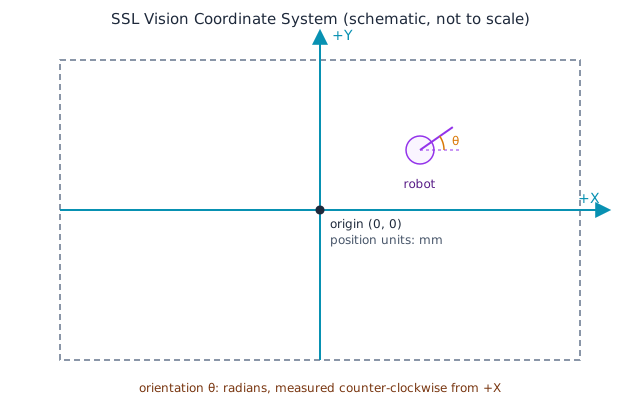
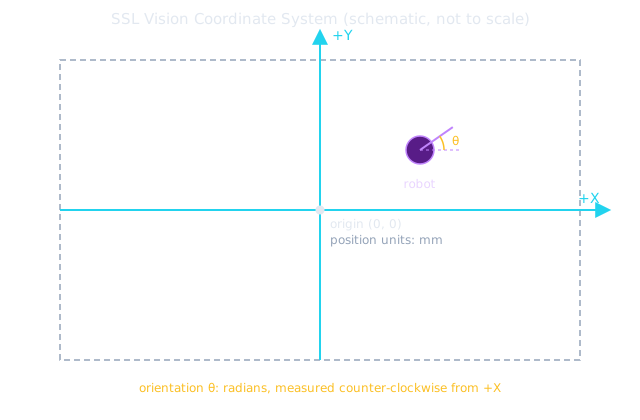
The coordinate frame is centered in the middle of the field, with +Y axis going up and the +X axis going right. When facing the field from the side table, nominally the negative most corner will be at the viewers bottom left and the positive most corner in the upper right.
Field |
Unit |
|---|---|
|
mm |
|
rad, CCW from +X |
|
s (unix timestamp, |
|
monotonic counter, unitless |
|
unitless, |
Multi-camera Handling and Filtering
SSL_DetectionsFrames carry only positions as seen by one camera. This means if you play on any field with more than one camera, you will receive a detection per camera. When robots/balls overlap cameras, the data stream will contain multiple detections of the object and the timestamps and positions may disagree slightly. This is intentional behavior, as teams may disagree on the approach to handle detections at boundaries. For example, when kicking off on a 4 camera field, all four cameras are likely to see the ball and robots at the center and you will receive 4 detections for each entity. This is visualized in the graphic below.
        ---
config:
  layout: elk
  elk:
    nodePlacementStrategy: NETWORK_SIMPLEX
---
flowchart LR
    subgraph Cams["Cameras"]
        C0["Camera 0"]
        C1["Camera 1"]
        CN["Camera N"]
    end

    C0 -- "SSL_DetectionFrame<br/>camera_id=0" --> Client["Team Client<br/>merge by camera_id,<br/>reconcile t_capture"]
    C1 -- "camera_id=1" --> Client
    CN -- "camera_id=N" --> Client

    classDef amber fill:#fffbeb,stroke:#d97706,color:#78350f;
    classDef cyan fill:#ecfeff,stroke:#0891b2,color:#164e63;
    class C0,C1,CN amber;
    class Client cyan;
There is no single agreed upon way to resolve these overlaps. An additional challenge is filtering position in velocity. Teams will see noise in this derivative without filtering. Again, there are many approaches to solve this. The committee notes that is a challenging problem in the SSL and robotics in general. Since 2023, the automatic referee software packages in use by the game controller publish their filtered game state. This is so teams can inspect the data interpretation behind issued penalties and infractions. It’s also intended to be a “decent” or better implementation of a shared data filter. Teams are allowed, and even encouraged, to use this filtered data in their AI. Eventually a team may need to write a custom filter, but its expected that years would pass for a new team before the autoref filter is a limiting factor. Many teams have written about vision filters in the SSL.
The referee protocol page documents how teams can use the filtered vision data from the automatic referees.
Network Flow
The diagram below is the same competition network fan-out shown in the
field network documentation, with the machines involved in the vision stream
highlighted and everything else (game state / referee / broadcast only) muted. Cameras and the Truss NUC produce it, the
Vision Computer publishes the merged 224.5.23.2:10006 stream, and team PCs (plus, optionally, a streaming PC) consume
it. The router and switch are highlighted too — they maintain the multicast group (IGMP snooping/querier) the whole
stream depends on, even though they never decode the vision data stream.

